Posts

Showing posts with the label Sitecore

Sitecore Identity - Sticky Virtual User Properties Issue

 I recently came across an issue with our CMS users getting elevated access permissions even after they were moved to a lower-level role. We use OKTA as our identity provider and use federated authentication to integrate Sitecore with OKTA for staff login. The OKTA group memberships are mapped to Sitecore roles using claims mapping to manage user roles in Sitecore. This was working fine for a long time until recently when we started noticing changing user roles in OKTA have no impact on the user permissions in Sitecore. I started troubleshooting by monitoring the network traffic during the login redirect, capturing the JWT token to inspect the claims we are receiving from OKTA. Once the user's group membership in OKTA has changed, I can see the new groups values in the claims. So, the issue has to be on the Sitecore end with claims to roles mapping. After further investigating into the code which hasn't changed in months, I looked into what else has changed. We did upgrade our ...

Sitecore Webhooks in action

Image
Sitecore introduced webhooks in Sitecore 10.3 release. The webhooks allows you to get real-time notifications on Sitecore server-side events to other systems. What are webhooks? Webhooks are basically HTTP call-backs. These are automated messages used for communication between two systems when an event is triggered on one system and the other system needs to be notified of the event. The webhooks payload usually consists of a lightweight message about the event in JSON or XML format. What is the need for webhooks in Sitecore? This is one of the features first introduced in Sitecore XM Cloud and later incorporated into Sitecore XP release. In a composable DXP with a SaaS based CMS like XM Cloud, we need an easy way to communicate with external systems using a plug and play framework like webhooks. This allows the CMS to notify the external systems of the server-side events happening at Sitecore so that the systems can take necessary actions of their own. An example of this is to clear e...

How to ace your Sitecore .Net Developer 10 Certification Exam

Image
  I have been a Sitecore developer for five years and worked on various Sitecore projects, yet every time I take the certification exam it makes me nervous. From my conversations with the other Sitecore developers I worked with, even the most experienced Sitecore developers are nervous about failing the certification exam. They try to avoid taking the exam unless absolutely necessary. A few reasons for this could be, The exam is too expensive to fail. Most employers will only reimburse the fee for successful certification attempts. The score required to pass the exam is quite high (80%) compared to your academic exams.  The Sitecore training modules for exam competencies can be expensive. Not everyone gets a chance to work on the latest version of Sitecore. The exam competencies include areas of Sitecore you never had a chance to work on. In this blog post I will share my most recent experience of preparing and successfully completing the Sitecore .NET 10 Developer certificati...

View and download Sitecore log files using Log Viewer

Image
As a Sitecore developer you would want to regularly monitor the log files for recurring errors and warnings and keep them clean. I am quite used to downloading my log files and running the tools like Sitecore Log Analyzer to filter and group errors and warnings.  As we started to productionise our website and apply the security hardening best practices, I ended up losing access to the logs folder and admin pages. To complicate the things further we started using containers to host our Sitecore instance with zero access to file system for developers, even when it is needed for troubleshooting issues.  The only way I could access the logs was using AWS Log Insights which gives you a stream of events without any option to download the full log file. It is especially difficult to troubleshoot issues when you need to correlate events from multiple logs which means you need to look for events across multiple log streams and try to put together the jigsaw puzzle to see the full pict...

Running SQL Queries On Sitecore Databases Using Sitecore PowerShell Extensions

Image
  Whether you are developing on Sitecore or supporting a live Sitecore instance, there are times you need to access the SQL databases to run queries to fetch some data. While the Sitecore APIs provide access to the items in the content tree, they are not very useful when you want to check the old login tickets in core database, or need to inspect the JWT tokens received from identity provider when using federated authentication.  There are many reasons for a Sitecore developer to want to access the Sitecore database. I am sure there are equal if not more number of reasons for the security team to deny access. Many a times you would be an admin on the Sitecore instance but won't even have read-only access to the SQL databases. In this article I am going to show how you can run simple queries on the Sitecore databases using the power of SPE. For this to work, you need to have access to use the PowerShell ISE on the Sitecore instance. First, we will need to fetch the connection s...

Sitecore OData Item Api extensions for reference type fields

 Sitecore OData Item Api provides readonly access to Sitecore items. The OData Item Api is particularly useful when you need to pull some data from Sitecore to show on a non-Sitecore websites. In my case, I needed to pull a list of current job opening in my organization to show them on our company's non-Sitecore website's careers page. For more information on OData Item Api and how to query the data, check the Sitecore documentation page . One thing that particularly bothered me when using OData Item Api service to get an item and its field values using a query like below is, the lack of support for getting the link field target URL in one query. /sitecore/api/ssc/aggregate/content/Items('{F7SDEBB9-6AB1-4ACC-A790-FE627DD18722}')?$expand=FieldValues&sc_apikey={ADGT918E-8F0F-4F7E-8C77-DEE3F4F2E1Y1} When you run the above query against an item with General link field, the output for the field values looks something like this As you can see, the link field value is just...

Data source and children content resolver

Image
If you worked on a Sitecore JSS implementation you must be familiar with the Rendering Content Resolvers used by the Layout Service to serialize the contents of a rendering data source into JSON. Out of the box, Sitecore comes with the following Rendering Content Resolvers Datasource Resolver    The default resolver which serializes the data source item Datasource Item Children Resolver   Serializes the datasource item's children Context Item Resolver Serializes the context item instead of the data source item Context Item Children Resolver  Similar to Datasource Item Children Resolver but serializes the children of the context item Folder Filter Resolver Serializes not just direct children but also the descendants of the data source item, excluding folders As you can see, there is no out of the box contents resolver that can serialize both the data source item and its children. This will be handy when you have a module that contains a parent data source item and ch...

Referencing local data sources using ID instead of path

Image
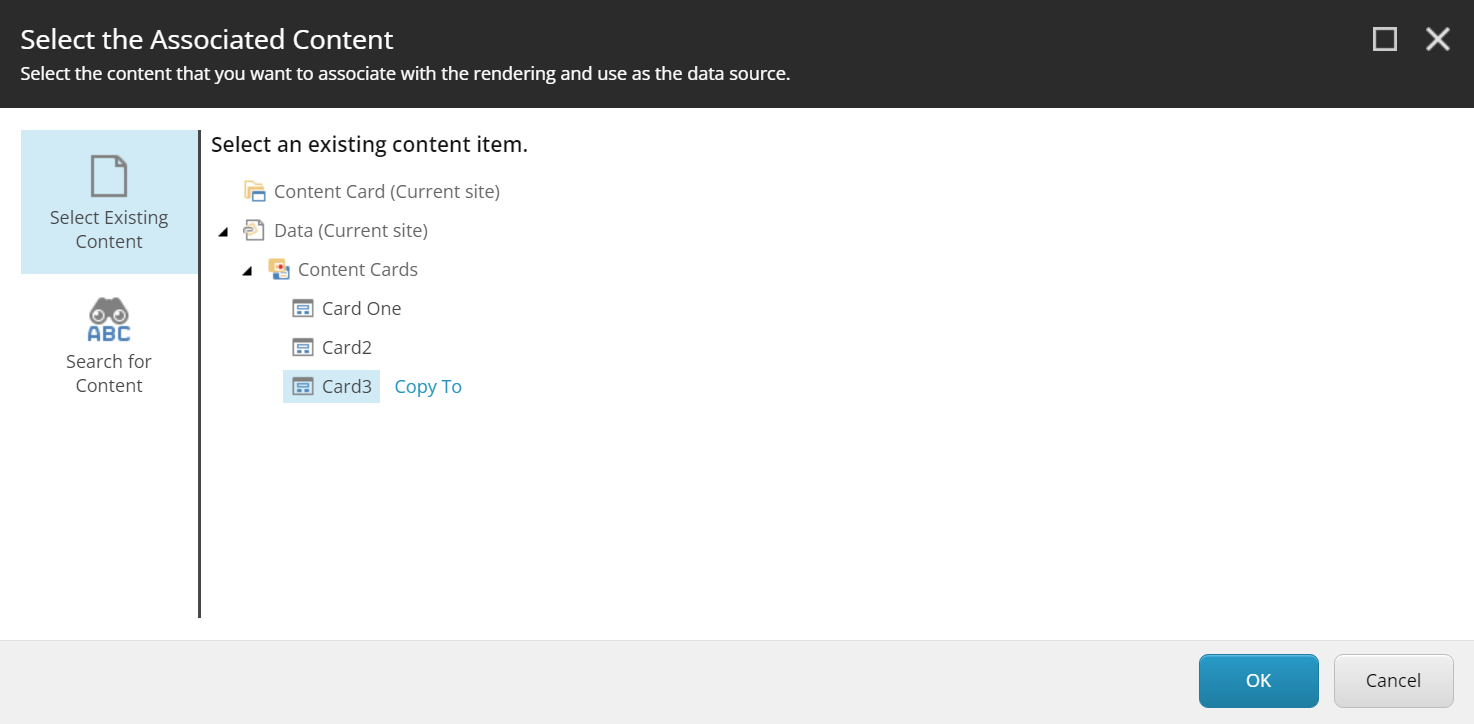
In my previous blog post  we discussed about the problem with renaming local data sources and the issue with converting data sources created in a hierarchical structure to IDs using the out of the box PowerShell script. In this post I am going to show how to prevent using path to reference local data sources in the first place. Sitecore decides on whether to use ID or path to link data source to the rendering in presentation details at the time of selection of data source using the Select Associated Content dialog. So, I decided to take a look into what's happening behind the scenes when you click OK on this dialog using the network traffic monitor in the browser developer tools. I noticed a call to the following URL with the below response. https://demo.dev.local/sitecore/shell/default.aspx?xmlcontrol=Sitecore.Shell.Applications.Dialogs.SelectRenderingDatasource&... The response has a command called SetDialogValue with the path of local data source as value. The same call ha...

Fix for the issue with renaming local data sources resulting in broken links

Image
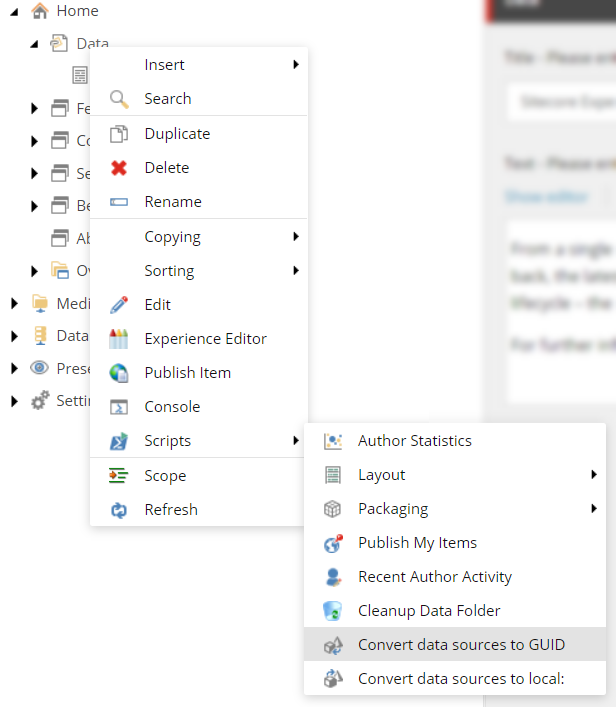
Sitecore introduced local/page data sources with SXA. The local data sources allow better organisation of your page specific and shared data sources. However, one challenge with local data sources is, the links to them won't automatically get updated when you rename them. This is because Sitecore uses the path instead of ID to link to local data sources. If you inspect the raw value of final renderings field of a page with module that has local data source you can see the path "local:/Data/...". For this reason Sitecore warns about renaming local data sources manually. The documentation clearly says you need to convert your local data source paths to IDs using the out of the box scripts provided before renaming the local data source item. (Source: https://doc.sitecore.com/xp/en/developers/sxa/93/sitecore-experience-accelerator/data-sources.html#rename-local-data-sources) The script works fine in most cases, except for when not all your data sources are direct children of ...

Using Sitecore FXM to update and track contacts

Image
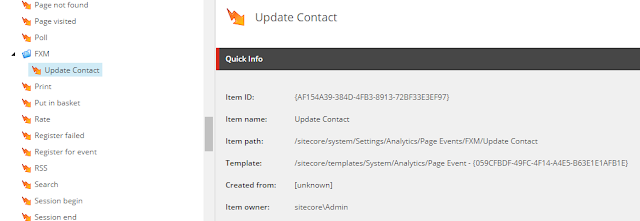
Sitecore Federated Experience Manager aka FXM is a great feature to utilize some of the Sitecore's CMS, marketing and analytics capabilities on non-Sitecore websites. If you are new to FXM you can read more about how to integrate FXM into your non-Sitecore website and utilize its capabilities on  Sitecore's FXM documentation page . While the well-known uses of FXM are to add placeholders to pages to show Sitecore content, track click action, assign marketing attributes and track goals, the area FXM lacks out of the box is contact tracking and updates. The FXM's scbeacon JavaScript API has following three methods you can use trackEvent trackGoal trackOutcome You can read more about these methods in the documentation . As you can see there is no out of the box API method to identify or update contact. In cases where you have a non-authenticated public website on Sitecore but an authenticated member portal on non-Sitecore website it would be really useful to pass the authentic...

Sitecore Content Search API - Random Search Results using Solr

More often than you think you may get a requirement to show random related content on a page, whether it's related news articles for news website or related sale items for an eCommerce website or friend suggestions for a social networking website. This is a common requirement in eCommerce where we want to cross sell items from the same category as the current item. Most of the RDBMS databases have this feature built-in to return a random results for a select query, however Sitecore uses search providers to get its results which makes this little tricky to achieve. In this article I will show how to achieve this using the Sitecore's default search provider Solr . Solr comes with a RandomSortField out of the box which you can use to sort results randomly. You will need to pass random_{RandomValue}  or  {RandomValue}_ random  as value for sort parameter to get your search results sorted randomly. However, for the same sort value the results are always sorted in the same orde...

SXA Scriban extension to get link field target URL

Scriban is the new templating language which was introduced in Sitecore 9.3, it replaces the obsolete NVelocity templates in the earlier versions. If you are upgrading from earlier versions of Sitecore and used a lot of NVelocity templates, you need to convert all your NVelocity templates to Scriban as NVelocity is no longer supported in Sitecore 9.3. Scriban is a powerful language with support to import your own .Net functions. Sitecore provides a rich set of Scriban extensions to use which meets most of the common requirements. You can find more about the out of the box Sitecore Scriban extensions here . While using Scriban to create custom markup which can't be achieved through other Rendering Variant fields I came across a requirement to wrap a section of HTML with an anchor tag targeting to an URL set in a link field in the template. In SXA we would set the link target field on the Rendering Variant and set the Is Link property value of the Rendering Variant field to W...

How to use HTML helper to render a SXA component in Razor view

Image
If you are migrating from traditional Sitecore to SXA, you may find part of your traditional component markup can be replaced with out of the box SXA component. Or if you are already using SXA you may find a need to reuse a SXA component or its Rendering Variant inside of your custom component's view. In my case, after building a custom Search Results component I realized that I can reuse one of the custom Rendering Variants I created for a Bootstrap Card markup to render search result item of my custom component. It allowed me to reuse the markup I created using Rendering Variant there by eliminating duplication of code. To render a component in your Razor view you can use the @Html.Sitecore().Rendering(path or id) helper. This works fine for rendering traditional Sitecore components. However, this helper was not built to accept the parameters required for SXA components, for e.g. the rendering variant name or id. I couldn't find any documentation on doc.sitecore.com o...